This page lists what the Golf Pad Events Agent can do in Early Access. We update it as new features arrive.
Available now
The Agent can create, edit and delete events, choose the course and tees from Golf Pad's 43,000+ course library, set up individual stroke play, gross and net formats, manage players and handicaps, organize groups and tee times, enter and correct scores, and publish live gross and net leaderboards on a public event page.
| Feature | Details |
| Events | Create, edit and delete events. Choose the course and tees from Golf Pad's 43,000+ course library. |
| Format | Individual stroke play, gross and net. |
| Players | Add and edit players and their handicaps. Type a list or paste it from a spreadsheet. |
| Groups and tee times | Set the groups and start times you choose. |
| Scores | Enter and correct scores. |
| Leaderboards | Live gross and net leaderboards on a public event page. |
| TV mode | Full-screen leaderboard for a clubhouse screen. |
The Agent asks for your OK before it makes any change.
Example requests
- "Set up a stroke play event at Pine Ridge on November 8, white tees."
- "Add Mike Torres 12, Sarah Lin 8 and Dave Park 18, groups of four from 8:30."
- "Fix Mike's score on hole 7 to a 5."
- "Give me the leaderboard link."
To see what the Agent can do, you can also ask it directly in your AI assistant: "What can you do with Golf Pad Events?"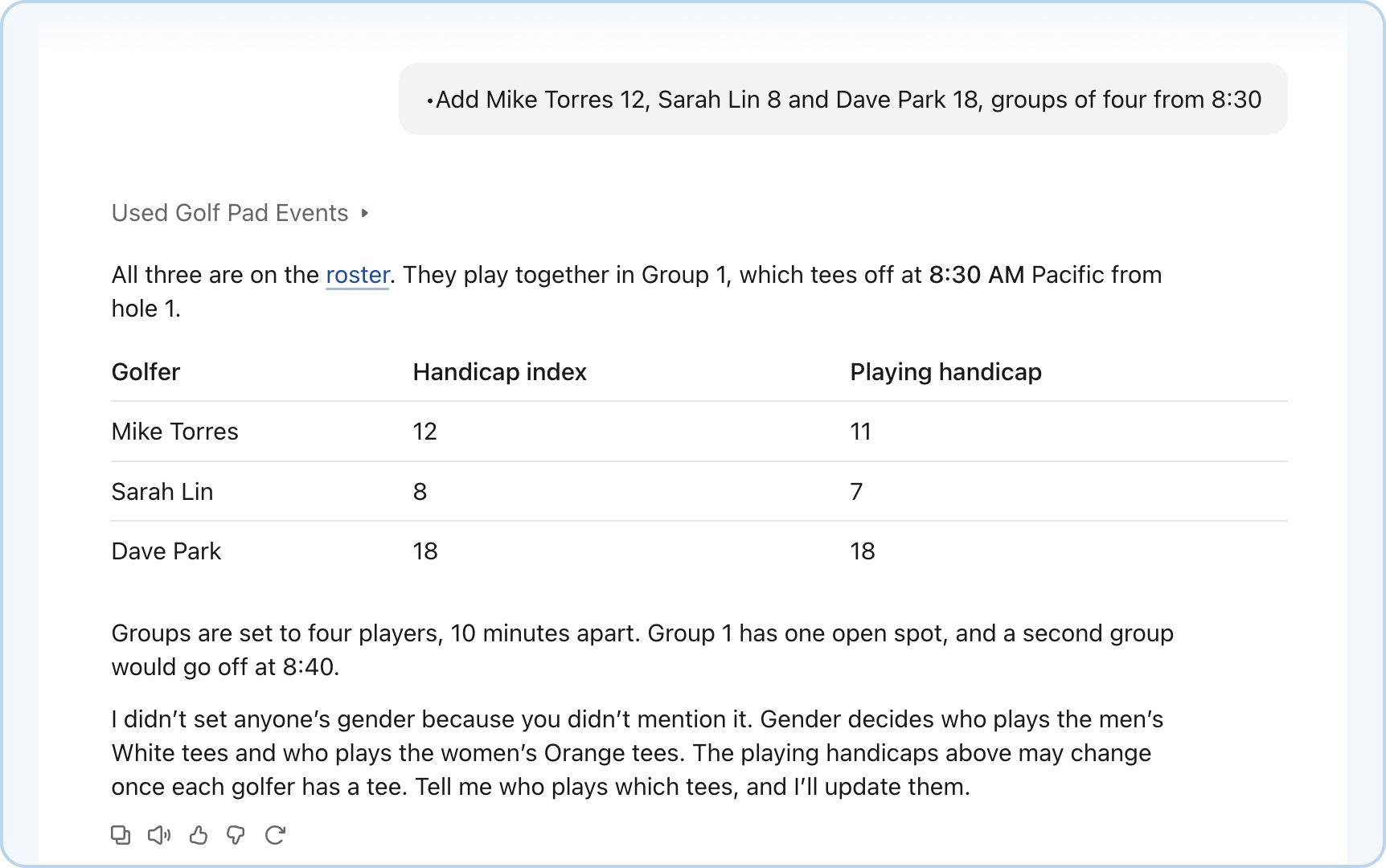
Not available yet
- Golf Pad app for players (joining and entering their own scores)
- Team formats
- Stableford, skins and flights
- Sign-up forms, email invitations and reminders
- Automatic tee sheets
- Payments and payouts
- Leagues
Bringing your golfers from your current account
During Early Access, the Agent works on a separate Golf Pad Events account, so your current events and golfers don't move over automatically. To bring your golfers along:
1. In your current account, export an event's golfers to a CSV file: open the event, go to Golfers, switch to the List tab, select the golfers and choose Export from the Actions menu. See How to Export Golfer Information.
2. Find the downloaded file (it's named after your event, for example Summer-Skins-2026-10-03-golfers.csv). Attach it to a chat with your AI assistant, or copy the names and handicaps from it and paste them in, then ask: "Add these golfers to the Fall Classic."
Tip: To export golfers from several past events in one file, create a new event in your current account, add everyone with Add from past events, and export that event's golfers.
Was this article helpful?
That’s Great!
Thank you for your feedback
Sorry! We couldn't be helpful
Thank you for your feedback
Feedback sent
We appreciate your effort and will try to fix the article