We're excited to introduce Club Dispersion! This feature helps you visualize the likely landing area for each club directly on the map. Instead of showing a single carry distance, dispersion displays a realistic shot pattern based on your own historical performance, helping you make more informed club selections on the course.
Club Dispersion is a Premium feature. You'll also need to have tracked some shots so we can build your personal pattern.
What is club dispersion?
Every golf shot has some variation in distance and direction. Club dispersion represents that variation as a pattern on the map, showing where your shots with a given club are most likely to finish. The pattern is generated entirely from your own recorded shot data — so it reflects the way you actually play.
How to view club dispersion
- On the course, open the map view.
- Tap the map to set a target. This puts you into measurement mode.
- Your club dispersion appears automatically around the expected landing zone for the recommended club, showing the likely spread of your shots.
- Use the dispersion chip on the map to show or hide the pattern at any time, or to open its appearance settings.
What you'll see
By default, dispersion is shown two ways:
- Shot dots — your individual past shots for that club, plotted relative to the target.
- Heatmap — a shaded “cloud” showing where your shots cluster most densely.
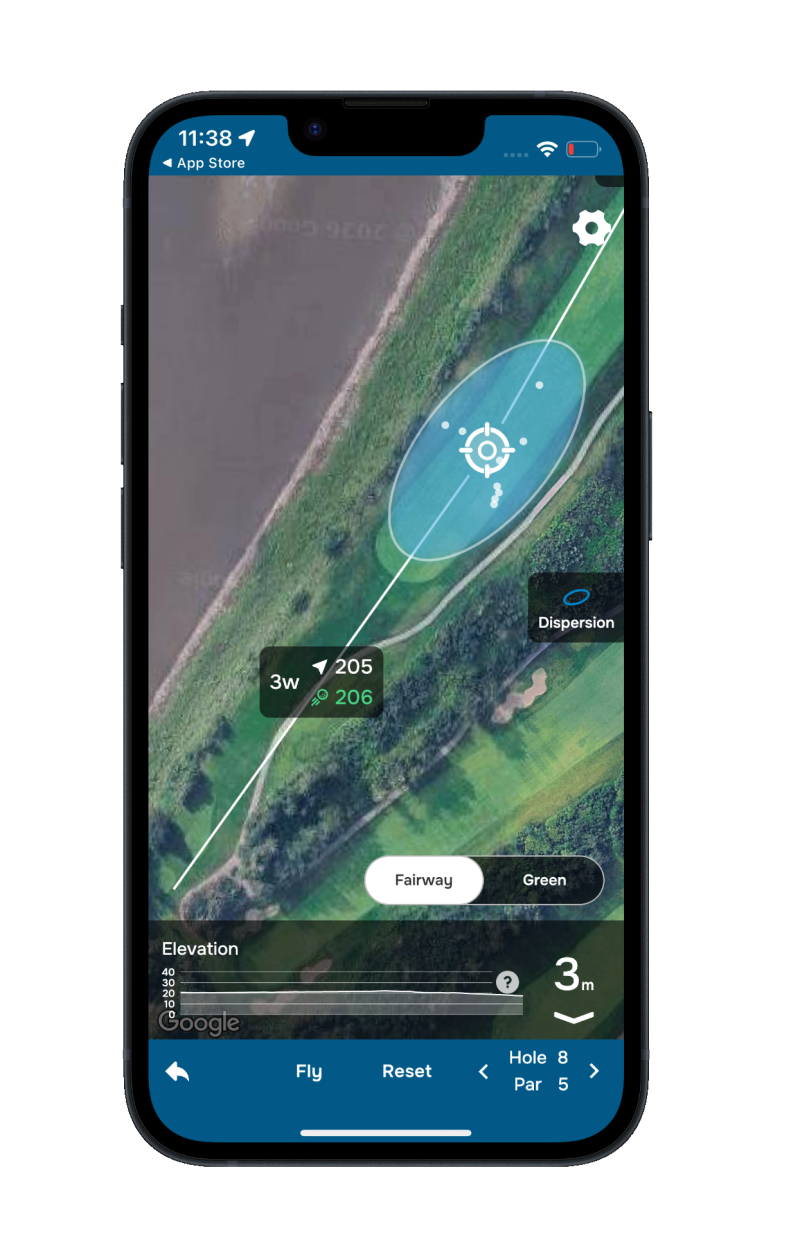
You can customize the look under Map Preferences > Map Dispersion > Customize — choose colors and opacity, and optionally turn on the dispersion ellipse, an outline that traces the boundary containing roughly 80% of your shots with that club.
How dispersion is calculated
Dispersion is built from the shots you've tracked across your recent rounds, grouped by club. As you play more rounds and track more shots, the pattern becomes more accurate and personalized.
A few things worth knowing:
- We use your most recent rounds to keep the pattern current with how you’re playing now.
- A club needs at least a few tracked shots before its dispersion can be shown. Until then, that club won’t display a pattern — just keep tracking your shots and it’ll fill in.
- Dispersion is available for full-swing clubs. Putters and chippers aren’t included.
- Wildly off-line or out-of-range shots are automatically filtered out so they don’t distort your pattern.
If a club doesn't have enough data yet, you'll simply see your target marker without a dispersion pattern.
Why club dispersion matters
Club dispersion gives you a more realistic view of your shot potential than distance alone. By understanding both your typical distance and your shot spread, you can make smarter club selections, steer clear of hazards, and pick targets that give you the best chance of success. Use it as part of your course-management strategy to play with greater confidence and consistency.
Was this article helpful?
That’s Great!
Thank you for your feedback
Sorry! We couldn't be helpful
Thank you for your feedback
Feedback sent
We appreciate your effort and will try to fix the article